Compare commits
6 Commits
| Author | SHA1 | Date | |
|---|---|---|---|

|
4c5c88769f | ||
|
|
c310fd441f | ||
|
|
12ac544e42 | ||
|
|
f868eb77b6 | ||
|
|
f56991410b | ||
|
|
9cbbd6cf45 |
@@ -49,7 +49,7 @@
|
||||
</assemblyBinding>
|
||||
</runtime>
|
||||
<appSettings>
|
||||
<add key="Version" value="2.4.15" />
|
||||
<add key="Version" value="2.4.16" />
|
||||
<add key="GitHubUrl" value="https://github.com/BookerLiu/GeekDesk" />
|
||||
<add key="GiteeUrl" value="https://gitee.com/BookerLiu/GeekDesk/tree/master" />
|
||||
<add key="GitHubUpdateUrl" value="https://raw.githubusercontent.com/BookerLiu/GeekDesk/master/Update.json" />
|
||||
|
||||
@@ -18,11 +18,12 @@
|
||||
<Setter Property="Margin" Value="0,0,0,1"/>
|
||||
<Setter Property="Background">
|
||||
<Setter.Value>
|
||||
<SolidColorBrush Opacity="0"/>
|
||||
<SolidColorBrush Color="Black" Opacity="0.01"/>
|
||||
</Setter.Value>
|
||||
</Setter>
|
||||
<Setter Property="FocusVisualStyle" Value="{x:Null}" />
|
||||
<EventSetter Event="MouseEnter" Handler="Menu_MouseEnter"/>
|
||||
<EventSetter Event="PreviewMouseLeftButtonDown" Handler="ListBoxItem_MouseDown"/>
|
||||
<!--<EventSetter Event="Unselected" Handler="Lbi_Unselected"/>-->
|
||||
<Style.Triggers>
|
||||
<MultiTrigger>
|
||||
@@ -45,7 +46,11 @@
|
||||
</BeginStoryboard>
|
||||
</MultiTrigger.ExitActions>
|
||||
<MultiTrigger.Setters>
|
||||
<Setter Property="Background" Value="Transparent"/>
|
||||
<Setter Property="Background">
|
||||
<Setter.Value>
|
||||
<SolidColorBrush Color="Black" Opacity="0.01"/>
|
||||
</Setter.Value>
|
||||
</Setter>
|
||||
<Setter Property="Foreground" Value="Black"/>
|
||||
</MultiTrigger.Setters>
|
||||
</MultiTrigger>
|
||||
@@ -133,7 +138,7 @@
|
||||
|
||||
<ListBox.ItemTemplate>
|
||||
<DataTemplate>
|
||||
<StackPanel Tag="{Binding}" MouseDown="ListBoxItem_MouseDown">
|
||||
<StackPanel Tag="{Binding}">
|
||||
<TextBox Text="{Binding Path=MenuName, Mode=TwoWay}"
|
||||
HorizontalAlignment="Left"
|
||||
Width="{Binding RelativeSource={RelativeSource FindAncestor,AncestorType={x:Type ListBox},AncestorLevel=1},Path=Tag, Mode=TwoWay, Converter={StaticResource MenuWidthConvert}, ConverterParameter=35}"
|
||||
|
||||
@@ -25,7 +25,7 @@ namespace GeekDesk.Control.UserControls.PannelCard
|
||||
|
||||
|
||||
//是否正在修改菜单
|
||||
private static bool IS_EDIT = false;
|
||||
public bool IS_EDIT = false;
|
||||
|
||||
public LeftCardControl()
|
||||
{
|
||||
@@ -205,9 +205,9 @@ namespace GeekDesk.Control.UserControls.PannelCard
|
||||
/// <param name="e"></param>
|
||||
private void RenameMenu(object sender, RoutedEventArgs e)
|
||||
{
|
||||
IS_EDIT = true;
|
||||
MenuInfo menuInfo = ((MenuItem)sender).Tag as MenuInfo;
|
||||
menuInfo.MenuEdit = (int)Visibility.Visible;
|
||||
IS_EDIT = true;
|
||||
}
|
||||
|
||||
/// <summary>
|
||||
@@ -276,6 +276,8 @@ namespace GeekDesk.Control.UserControls.PannelCard
|
||||
menuInfo.MenuEdit = Visibility.Collapsed;
|
||||
}
|
||||
IS_EDIT = false;
|
||||
//为了解决无法修改菜单的问题
|
||||
MainWindow.mainWindow.SearchBox.Focus();
|
||||
MenuListBox.SelectedIndex = menuSelectIndexTemp;
|
||||
}
|
||||
}
|
||||
@@ -309,6 +311,7 @@ namespace GeekDesk.Control.UserControls.PannelCard
|
||||
|
||||
private void Menu_SelectionChanged(object sender, SelectionChangedEventArgs e)
|
||||
{
|
||||
if (IS_EDIT) return;
|
||||
//设置对应菜单的图标列表
|
||||
if (MenuListBox.SelectedIndex == -1)
|
||||
{
|
||||
@@ -359,8 +362,31 @@ namespace GeekDesk.Control.UserControls.PannelCard
|
||||
{
|
||||
MainWindow.mainWindow.HidedSearchBox();
|
||||
}
|
||||
|
||||
ListBoxItem lbi = sender as ListBoxItem;
|
||||
MenuInfo mi = lbi.DataContext as MenuInfo;
|
||||
int index = MenuListBox.Items.IndexOf(mi);
|
||||
MenuListBox.SelectedIndex = index;
|
||||
}
|
||||
|
||||
|
||||
///// <summary>
|
||||
///// 点击菜单后 隐藏搜索框
|
||||
///// </summary>
|
||||
///// <param name="sender"></param>
|
||||
///// <param name="e"></param>
|
||||
//private void ListBoxItemPanel_MouseDown(object sender, MouseButtonEventArgs e)
|
||||
//{
|
||||
// if (RunTimeStatus.SEARCH_BOX_SHOW)
|
||||
// {
|
||||
// MainWindow.mainWindow.HidedSearchBox();
|
||||
// }
|
||||
// MenuInfo mi = (sender as StackPanel).Tag as MenuInfo;
|
||||
// int index = MenuListBox.Items.IndexOf(mi);
|
||||
// MenuListBox.SelectedIndex = index;
|
||||
//}
|
||||
|
||||
|
||||
/// <summary>
|
||||
/// 隐藏搜索框
|
||||
/// </summary>
|
||||
|
||||
@@ -81,15 +81,25 @@ namespace GeekDesk.Control.Windows
|
||||
if (window == null || !window.Activate())
|
||||
{
|
||||
window = new GlobalColorPickerWindow();
|
||||
window.Opacity = 0;
|
||||
App.DoEvents();
|
||||
window.Show();
|
||||
}
|
||||
window.Hide();
|
||||
GlobalColorPickerWindow thisWindow = (GlobalColorPickerWindow)window;
|
||||
if (thisWindow.colorPickerWindow == null || !thisWindow.colorPickerWindow.Activate())
|
||||
new Thread(() =>
|
||||
{
|
||||
thisWindow.colorPickerWindow = new PixelColorPickerWindow(thisWindow.MyColorPicker);
|
||||
}
|
||||
thisWindow.colorPickerWindow.Show();
|
||||
Thread.Sleep(200);
|
||||
App.Current.Dispatcher.Invoke(() =>
|
||||
{
|
||||
GlobalColorPickerWindow thisWindow = (GlobalColorPickerWindow)window;
|
||||
if (thisWindow.colorPickerWindow == null || !thisWindow.colorPickerWindow.Activate())
|
||||
{
|
||||
thisWindow.colorPickerWindow = new PixelColorPickerWindow(thisWindow.MyColorPicker);
|
||||
}
|
||||
thisWindow.colorPickerWindow.Show();
|
||||
});
|
||||
}).Start();
|
||||
|
||||
}
|
||||
|
||||
public static void Show()
|
||||
@@ -98,6 +108,7 @@ namespace GeekDesk.Control.Windows
|
||||
{
|
||||
window = new GlobalColorPickerWindow();
|
||||
}
|
||||
window.Opacity = 1;
|
||||
window.Show();
|
||||
Keyboard.Focus(window);
|
||||
}
|
||||
|
||||
@@ -125,7 +125,7 @@
|
||||
</DockPanel>
|
||||
|
||||
|
||||
<uc:LeftCardControl Grid.Row="1" Grid.Column="0"/>
|
||||
<uc:LeftCardControl x:Name="LeftCard" Grid.Row="1" Grid.Column="0"/>
|
||||
|
||||
<!--分割线-->
|
||||
<GridSplitter Opacity="0" Grid.Row="1" Grid.Column="0" Width="1" VerticalAlignment="Stretch" HorizontalAlignment="Right"/>
|
||||
@@ -141,11 +141,9 @@
|
||||
TextChanged="SearchBox_TextChanged"
|
||||
/>
|
||||
|
||||
<uc:RightCardControl x:Name="RightCard" Grid.Row="1" Grid.Column="1"/>
|
||||
|
||||
<hc:NotifyIcon Icon="/Taskbar.ico" Click="NotifyIcon_Click" x:Name="BarIcon"
|
||||
MouseRightButtonDown="BarIcon_MouseRightButtonDown"
|
||||
Visibility="{Binding AppConfig.ShowBarIcon, Mode=TwoWay, Converter={StaticResource Boolean2VisibilityConverter}}">
|
||||
<hc:NotifyIcon Icon="/Taskbar.ico" Click="NotifyIcon_Click" x:Name="BarIcon"
|
||||
Visibility="{Binding AppConfig.ShowBarIcon, Mode=TwoWay, Converter={StaticResource Boolean2VisibilityConverter}}">
|
||||
<hc:NotifyIcon.ContextMenu>
|
||||
<ContextMenu Width="130" x:Name="TaskbarContextMenu">
|
||||
<MenuItem Header="打开面板" Click="ShowApp"/>
|
||||
@@ -158,8 +156,10 @@
|
||||
<MenuItem Header="退出" Click="ExitApp"/>
|
||||
</ContextMenu>
|
||||
</hc:NotifyIcon.ContextMenu>
|
||||
|
||||
</hc:NotifyIcon>
|
||||
|
||||
<uc:RightCardControl x:Name="RightCard" Grid.Row="1" Grid.Column="1"/>
|
||||
|
||||
<StackPanel hc:Growl.GrowlParent="True" VerticalAlignment="Top" Margin="0,10,10,0"/>
|
||||
</Grid>
|
||||
</Border>
|
||||
|
||||
@@ -1,5 +1,6 @@
|
||||
using GeekDesk.Constant;
|
||||
using GeekDesk.Control.UserControls.Config;
|
||||
using GeekDesk.Control.UserControls.PannelCard;
|
||||
using GeekDesk.Control.Windows;
|
||||
using GeekDesk.Interface;
|
||||
using GeekDesk.MyThread;
|
||||
@@ -718,29 +719,24 @@ namespace GeekDesk
|
||||
/// <param name="e"></param>
|
||||
private void ColorPicker(object sender, RoutedEventArgs e)
|
||||
{
|
||||
TaskbarContextMenu.Visibility = Visibility.Collapsed;
|
||||
App.DoEvents();
|
||||
TaskbarContextMenu.IsOpen = false;
|
||||
GlobalColorPickerWindow.CreateNoShow();
|
||||
}
|
||||
|
||||
/// <summary>
|
||||
/// 防止点击拾色器后无法显示菜单的问题
|
||||
/// </summary>
|
||||
/// <param name="sender"></param>
|
||||
/// <param name="e"></param>
|
||||
private void BarIcon_MouseRightButtonDown(object sender, MouseButtonEventArgs e)
|
||||
{
|
||||
TaskbarContextMenu.Visibility = Visibility.Visible;
|
||||
}
|
||||
|
||||
private void Window_GotFocus(object sender, RoutedEventArgs e)
|
||||
{
|
||||
Keyboard.Focus(SearchBox);
|
||||
if (!LeftCard.IS_EDIT)
|
||||
{
|
||||
//if判断是为了能够使修改菜单时 菜单能够获得焦点
|
||||
Keyboard.Focus(SearchBox);
|
||||
}
|
||||
}
|
||||
|
||||
private void AppWindow_Deactivated(object sender, EventArgs e)
|
||||
{
|
||||
AppWindowLostFocus();
|
||||
}
|
||||
|
||||
}
|
||||
}
|
||||
|
||||
@@ -49,5 +49,5 @@ using System.Windows;
|
||||
//可以指定所有这些值,也可以使用“生成号”和“修订号”的默认值
|
||||
//通过使用 "*",如下所示:
|
||||
// [assembly: AssemblyVersion("1.0.*")]
|
||||
[assembly: AssemblyVersion("2.4.1.5")]
|
||||
[assembly: AssemblyFileVersion("2.4.1.5")]
|
||||
[assembly: AssemblyVersion("2.4.1.6")]
|
||||
[assembly: AssemblyFileVersion("2.4.1.6")]
|
||||
|
||||
73
README.md
73
README.md
@@ -1,77 +1,46 @@
|
||||
# GeekDesk 极客桌面
|
||||
小巧、**美观**的桌面快速启动管理工具
|
||||
|
||||
———— 大风, 雨夜...
|
||||
「你来了」
|
||||
「我来了」
|
||||
谈一谈做GeekDesk的原因:
|
||||
|
||||
「你究竟想干什么!」
|
||||
「我想做一款软件, 这个软件要Cool」
|
||||
|
||||
「什么软件?」
|
||||
「从最常用的桌面开始吧」
|
||||
目前的市场上也有一部分桌面图标管理工具, 但是**界面好点的收费**, **免费的界面差**
|
||||
**windows11**都来了, 难道还要用界面停留在**win7时代**的软件吗
|
||||
|
||||
「哼!现在的软件多入牛毛, 会差你一个吗」
|
||||
「我不知道, 但是我想做」
|
||||
所以就萌生了做这款软件的想法, **免费 / 美观 / 高度定制化** 是从GeekDesk诞生开始就有的需求和方向, 未来也会向着这些方向发展
|
||||
目前GeekDesk只有一个人在开发, 大家如果有好的建议也可以提Issue
|
||||
|
||||
「你以为凭你一个人的力量能在这大海里掀起什么波浪吗」
|
||||
「但只要我想就够了, 这是我的梦想!」
|
||||
|
||||
「梦想? 可笑, 这世界哪有什么梦想. 不过是一日三餐, 车子和房!」
|
||||
「我想...就够了...」
|
||||
|
||||
「...」
|
||||
———— 雨停, 狂风仍在呼啸...
|
||||
|
||||
<img src="https://s4.ax1x.com/2021/12/15/TSrwfU.png" a border="0" width="800px"/>
|
||||
|
||||
|
||||
**免费 / 美观 / 高度定制化** 是从GeekDesk诞生开始就有的需求和方向, 未来也会向着这些方向发展
|
||||
|
||||
目前GeekDesk只有一个人在开发所以想法有限, 大家如果有好的建议也可以提Issue
|
||||
|
||||
另外如果你喜欢 GeekDesk的话, 或许可以为作者购买防脱洗发水
|
||||
当然, 点个**Star**也是对作者的激励哦~ 😊😊😊
|
||||
|
||||
|
||||
### GitHub
|
||||
[https://github.com/Demo-Liu/GeekDesk](https://github.com/Demo-Liu/GeekDesk)
|
||||
### 码云
|
||||
[https://gitee.com/demo_liu/GeekDesk](https://gitee.com/demo_liu/GeekDesk)
|
||||
|
||||
<img src="https://z3.ax1x.com/2021/07/20/WYdfmR.jpg" alt="WYdfmR.jpg" border="0" width="400px"/>
|
||||
## 开发框架
|
||||
- wpf
|
||||
- .net 4.7.2
|
||||
- [HandyControl](https://github.com/HandyOrg/HandyControl)
|
||||
|
||||
## 全局热键 一键呼出 鼠标跟随
|
||||
- 自定义热键 设置并使用自己习惯的快捷键
|
||||
- 一键呼出 使用鼠标中键呼出
|
||||
- 鼠标跟随 自动追随鼠标位置
|
||||
<img src="https://s4.ax1x.com/2021/12/15/TSlg8f.gif" alt="WJt4hQ.gif" border="0" width="800px"/>
|
||||
## 全局热键 鼠标跟随 快速启动 随时随地
|
||||
- 支持自定义热键
|
||||
- 支持鼠标跟随
|
||||
<img src="https://z3.ax1x.com/2021/07/19/WJt4hQ.gif" alt="WJt4hQ.gif" border="0" width="800px"/>
|
||||
|
||||
## 自定义壁纸
|
||||
- 随意选择自己喜欢的壁纸
|
||||
<img src="https://s4.ax1x.com/2021/12/15/TSNx4H.gif" alt="WJt4hQ.gif" border="0" width="800px"/>
|
||||
|
||||
[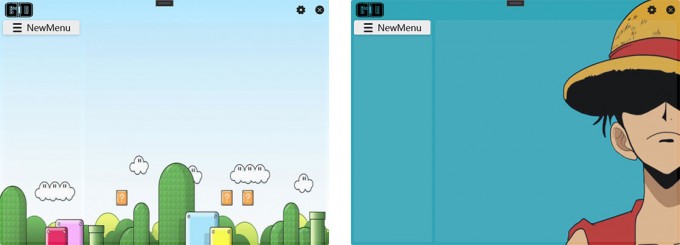](https://imgtu.com/i/WJlcIs)
|
||||
|
||||
## 毛玻璃等界面效果
|
||||
- 背景图片毛玻璃效果
|
||||
- 界面透明度
|
||||
- 界面圆角
|
||||
<img src="https://s4.ax1x.com/2021/12/15/TSabTO.gif" alt="WGOYSU.gif" border="0" width="800px"/>
|
||||
<img src="https://z3.ax1x.com/2021/07/19/WGOYSU.gif" alt="WGOYSU.gif" border="0" width="800px"/>
|
||||
|
||||
## 自定义菜单图标
|
||||
- 80多个系统图标可供选择
|
||||
- 另支持在线导入阿里巴巴icon图标
|
||||
- ~~篇幅原因,公众号内回复 **自定义图标** 可以查看教程~~ 现在软件内已经贴上教程链接啦 也欢迎大家关注我的公众号:blush:
|
||||
<img src="https://s4.ax1x.com/2021/12/15/TSd1NF.gif" border="0" width="800px"/>
|
||||
- 篇幅原因,公众号内回复 **自定义图标** 可以查看教程
|
||||
<img src="https://z3.ax1x.com/2021/07/19/WJ3fDU.png" alt="WJ3fDU.png" border="0" width="450px"/>
|
||||
|
||||
## 定时提醒 永不忘记
|
||||
- 快捷键快速新建待办事项
|
||||
<img src="https://s4.ax1x.com/2021/12/15/TSDCvj.gif" alt="WJU6df.gif" border="0" width="800px"/>
|
||||
<img src="https://z3.ax1x.com/2021/07/19/WJU6df.gif" alt="WJU6df.gif" border="0" width="800px"/>
|
||||
|
||||
## 开发框架
|
||||
- wpf
|
||||
- .net 4.7.2
|
||||
- [HandyControl](https://github.com/HandyOrg/HandyControl)
|
||||
|
||||
## Stargazers over time
|
||||
[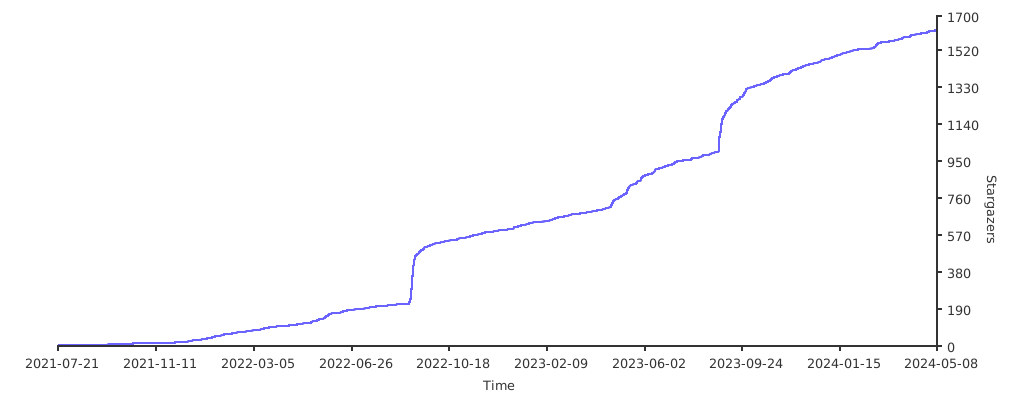](https://starchart.cc/Demo-Liu/GeekDesk)
|
||||
## LICENSE
|
||||
- 这是个人开发的程序,任何人可任意修改和免费使用(未做较大功能性改动不允许修改赞赏码,重新修改发布需注明出处)
|
||||
- 商用需联系作者
|
||||
|
||||
@@ -1,9 +1,9 @@
|
||||
{
|
||||
"title": "GeekDesk版本更新",
|
||||
"subTitle": "V2.4.15",
|
||||
"subTitle": "V2.4.16",
|
||||
"msgTitle": "本次更新内容如下",
|
||||
"msg": "['PS:又一次的更新, 虽然还有很多需求没有完成, 但仍然耗费了我大量的精力, 没有点Star的兄弟萌, 求个免费Star(GitHub国内某些用户可能进不去), 再给我一点更新的动力!','增加纯色/渐变色背景','增加/优化拾色器功能','增加主面板Logo开关','优化待办任务,现在待办任务快捷键不再是新建待办窗口','增加鼠标滚轮切换菜单功能(需要鼠标指针在菜单栏)','优化搜索功能,增加 快捷键搜索/按键即搜 可选操作','优化贴边隐藏动画, 纵享丝滑了属于是兄弟萌', '其它已知问题修复']",
|
||||
"githubUrl": "https://github.com/Demo-Liu/GeekDesk/releases",
|
||||
"msg": "['兄弟萌求Star, 求Star, 由于功能越来越多, 之后的更新我会测试一周再发布, 尽量做到没有BUG, 见谅', '这个版本没有功能性改变, 主要是为了修复上个版本的bug', '修复无法修改菜单名称的问题', '修复通过任务栏图标打开拾色器, 图标菜单消失问题']",
|
||||
"githubUrl": "https://github.com/BookerLiu/GeekDesk/releases",
|
||||
"giteeUrl": "https://gitee.com/BookerLiu/GeekDesk/releases",
|
||||
"version": "2.4.15"
|
||||
"version": "2.4.16"
|
||||
}
|
||||
Reference in New Issue
Block a user